



 Orders
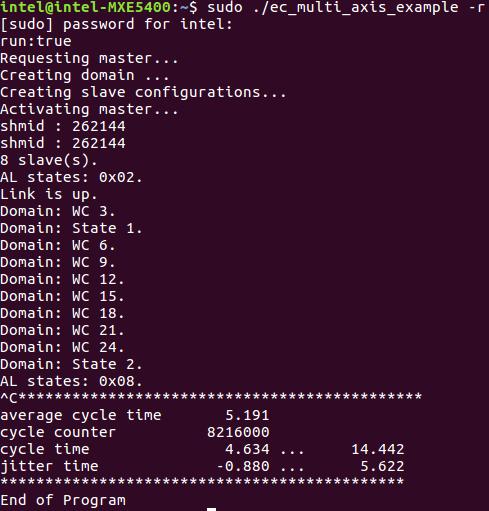
EtherCAT is one of the fastest industrial fieldbus protocols available, and SOEM — the Simple Open EtherCAT Master — is the go-to open source library for building a master application in C. This tutorial walks you from zero to a working cyclic process data loop, covering the build system, project structure, slave discovery, and real-time I/O.
What Is SOEM?
SOEM (Simple Open EtherCAT Master) is a compact, portable EtherCAT master library written in C. It is maintained by the Open EtherCAT Society and released under the MIT license, which means you can embed it in commercial products without licensing fees or legal friction.
Key characteristics:
- Language: Pure C (C99), no C++ required
- Platforms: Linux (raw socket or PREEMPT_RT), Windows (WinPCAP/Npcap), macOS, RTEMS, INtime, and more via OS Abstraction Layer (OSAL)
- Footprint: Small enough to run on embedded Linux boards such as the Raspberry Pi or BeagleBone
- Standards: Implements ETG.1000 EtherCAT specification; supports CoE (CANopen over EtherCAT), FoE, EoE, and distributed clocks
The library drives the NIC directly at the Ethernet frame level. There is no kernel driver involved — SOEM opens a raw socket and builds EtherCAT frames itself, which keeps latency predictable.
Why Engineers Choose SOEM Over Proprietary Stacks
Commercial EtherCAT master stacks from vendors like Acontis or KPA cost thousands of dollars per deployment and often lock you into a specific OS or hardware platform. SOEM removes those barriers:
- Zero cost — MIT license, no royalty or seat fee
- Full source access — you can read, modify, and debug every layer of the stack
- Active community — bug fixes, platform ports, and example code contributed on GitHub
- Proven in production — used in collaborative robots, CNC controllers, and semiconductor handling equipment worldwide
The trade-off is that SOEM does not provide a configuration tool or GUI. You write the master application in C, which gives you precise control but requires understanding the EtherCAT state machine.
Building SOEM from Source
SOEM uses CMake and has no external dependencies beyond a standard C compiler and the build tools.
# Clone the repository
git clone https://github.com/OpenEtherCATsociety/SOEM.git
cd SOEM

# Configure the build (out-of-source)
cmake -B build

# Build
cmake --build build

# Optional: install headers and library system-wide
cmake --install build
After the build, the static library libsoem.a (or soem.lib on Windows) sits in build/. The example applications are in build/test/linux/ and are worth reading before you write your own master.
Project Structure Overview
Understanding the source layout helps when you need to port SOEM to a new platform or trace a bug.
SOEM/
├── soem/          # Core EtherCAT master logic
│   ├── ethercatbase.c   # Low-level frame construction
│   ├── ethercatcoe.c    # CoE (SDO/PDO) protocol
│   ├── ethercatdc.c     # Distributed clock synchronisation
│   ├── ethercatmain.c   # Master state machine, slave discovery
│   └── ethercattype.h   # EtherCAT type definitions
├── osal/          # OS Abstraction Layer
│   ├── linux/     # Linux-specific timer and thread helpers
│   └── win32/     # Windows equivalents
└── oshw/          # OS/hardware Abstraction Layer
    ├── linux/     # Raw socket send/receive for Linux
    └── win32/     # Npcap send/receive for Windows
When you link against libsoem.a you pull in all three layers. If you need to port to a bare-metal RTOS, you replace osal/ and oshw/ with your own implementations — the soem/ core remains unchanged.
Writing a Minimal Master Application
Include Headers and Declare Globals
#include <stdio.h>
#include <string.h>
#include "ethercat.h"   // single header that pulls in all SOEM types and APIs

#define EC_TIMEOUTMON 500

char IOmap[4096];       // PDO I/O buffer shared with the EtherCAT stack
Initialise the NIC
int ifindex = ec_init("eth0");   // pass your NIC name here
if (ifindex <= 0) {
    fprintf(stderr, "ec_init() failed — check NIC name and root privileges\n");
    return -1;
}
printf("ec_init on eth0 succeeded.\n");
ec_init() opens a raw socket on the named interface. On Linux you must run the application as root (or with CAP_NET_RAW) because raw sockets require elevated privileges.
Enumerate Slaves
if (ec_config_init(FALSE) > 0) {
    printf("Found %d slave(s):\n", ec_slavecount);
    for (int i = 1; i <= ec_slavecount; i++) {
        printf("  Slave %d: %s\n", i, ec_slave[i].name);
    }
} else {
    printf("No slaves found.\n");
    ec_close();
    return -1;
}
ec_config_init(FALSE) broadcasts an EtherCAT Init command and reads back the EEPROM identity of every slave on the ring. The second parameter controls whether SOEM attempts to recover slaves already in a higher state.
Map Process Data Objects
ec_config_map(&IOmap);
ec_configdc();          // configure distributed clocks if slaves support it
ec_config_map() reads each slave's SyncManager and PDO configuration from its object dictionary and assigns addresses within IOmap. After this call, ec_slave[i].inputs and ec_slave[i].outputs point directly into the IOmap buffer — no copying required.
ec_configdc() synchronises the slaves' internal clocks to the reference clock on slave 1, which is essential for deterministic motion control.
Transition to Operational State
ec_slave[0].state = EC_STATE_SAFE_OP;
ec_writestate(0);           // 0 = broadcast to all slaves
ec_statecheck(0, EC_STATE_SAFE_OP, EC_TIMEOUTSTATE * 4);

ec_slave[0].state = EC_STATE_OPERATIONAL;
ec_send_processdata();
ec_receive_processdata(EC_TIMEOUTRET);
ec_writestate(0);
ec_statecheck(0, EC_STATE_OPERATIONAL, EC_TIMEOUTSTATE * 4);

printf("All slaves now in OPERATIONAL state.\n");
The EtherCAT state machine requires slaves to pass through INIT → PRE_OP → SAFE_OP before reaching OPERATIONAL. SOEM handles the intermediate transitions internally when you write to ec_slave[0].state (slave 0 is the broadcast address).
Cyclic Process Data Loop
int wkc;
int expectedWKC = (ec_group[0].outputsWKC * 2) + ec_group[0].inputsWKC;

for (int cycle = 0; cycle < 10000; cycle++) {
    ec_send_processdata();
    wkc = ec_receive_processdata(EC_TIMEOUTRET);

    if (wkc >= expectedWKC) {
        // Process data exchange was successful — read or write IOmap here
    }

    osal_usleep(1000);   // 1 ms cycle time
}
ec_send_processdata() builds an LRW (Logical Read/Write) Ethernet frame from IOmap and transmits it. ec_receive_processdata() waits for the frame to return and updates IOmap with the slaves' response. The working counter wkc increments for each slave that successfully participated; comparing it to expectedWKC tells you whether every slave responded.
Reading Process Data from a Servo Drive
A typical EtherCAT servo drive maps its status word and actual position into its input PDOs. After ec_config_map(), you access them directly via the slave's inputs pointer.
// Assuming slave 1 maps: bytes 0-1 = status word, bytes 4-7 = actual position
uint16_t status_word  = *((uint16_t *)(ec_slave[1].inputs + 0));
int32_t  act_position = *((int32_t  *)(ec_slave[1].inputs + 4));

printf("Slave 1 status: 0x%04X  position: %d counts\n",
       status_word, act_position);

// Write target position to output PDOs
int32_t target = 100000;  // counts
*((int32_t *)(ec_slave[1].outputs + 4)) = target;
The exact byte offsets depend on the drive's PDO mapping, which you can read from its object dictionary or from the SOEM debug output (ec_slave[1].Ibytes, ec_slave[1].Obytes).
Compiling and Running the Application
gcc -o ethercat_demo main.c \
    -I/path/to/SOEM/soem \
    -I/path/to/SOEM/osal \
    -I/path/to/SOEM/osal/linux \
    -I/path/to/SOEM/oshw/linux \
    -L/path/to/SOEM/build \
    -lsoem -lpthread

# Run as root (raw socket requires privilege)
sudo ./ethercat_demo eth0
If you installed SOEM system-wide via cmake --install, replace the -I and -L paths with /usr/local/include/soem and /usr/local/lib respectively.
Debugging Tips
Check individual slave states
for (int i = 1; i <= ec_slavecount; i++) {
    ec_statecheck(i, EC_STATE_OPERATIONAL, EC_TIMEOUTSTATE);
    printf("Slave %d state: 0x%02X  AL status: 0x%04X\n",
           i, ec_slave[i].state, ec_slave[i].ALstatuscode);
}
ec_slave[i].ALstatuscode contains the application layer error code from the slave's ESC. The ETG.1000.6 specification lists all codes — common ones are 0x001A (invalid output config) and 0x001B (invalid input config), both of which point to a PDO mapping mismatch.
Monitor the working counter
A WKC below expectedWKC means at least one slave dropped out of the exchange. Log both values every cycle during commissioning:
if (wkc < expectedWKC) {
    printf("WKC error: got %d, expected %d\n", wkc, expectedWKC);
}
Use SOEM's built-in error stack
while (EcatError) {
    printf("%s", ec_elist2string());
}
SOEM maintains an internal circular error buffer. Draining it after each cycle surfaces protocol-level issues that the WKC counter alone does not explain.
Run on a PREEMPT_RT kernel for real motion control
For cycle times below 4 ms or multi-axis synchronised motion, patch your Linux kernel with PREEMPT_RT and lock the master thread to a dedicated CPU core using pthread_setaffinity_np(). Plain Linux with SCHED_FIFO and mlockall() is often sufficient for 1–4 ms cycles on lightly loaded systems.
Ready to Use SOEM in Production?
Lichi Robotics builds production-ready SOEM-based EtherCAT master systems in India — compatible with Yaskawa, Siemens, Delta, Panasonic, and any EtherCAT servo drive.
👉 See Our EtherCAT Solutions →
WhatsApp Us for a Free Demo — free demo with complete technical support included.